Picture and name
Choose one of Vimini’s illustrations or a photo of your own, and set your name and username.
Your profile
Your Vimini profile tells friends what kind of eater you are. Set the details that describe your taste, and let your titles and travels fill in the rest as you save viminis.


Choose one of Vimini’s illustrations or a photo of your own, and set your name and username.
Pick up to 3 favorite cities where you are the expert, plus your favorite tags and any diets you follow.
Set your own rating scale so friends know what a score means coming from you.
Profile setup walks you through your picture and diets, and lets you import your lists and connect Instagram along the way.
As you save viminis, your profile shows your best titles, your level, and the countries you have visited.
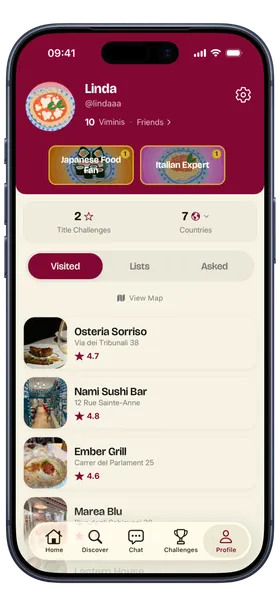
Open Settings to edit your details, favorite cities, and tags, choose Quick or Full as your default vimini, switch language, or change your privacy level.
Yes. Pick a photo from your phone or one of the illustrations made for Vimini.
They show friends the places where you know the restaurants best. You can pick up to 3.
It depends on your privacy level: public, private, or super private. You can change it at any time in Settings.
Download Vimini for free and show your friends how you really eat.