Connect in a minute
Add your Instagram username in Vimini and confirm it with the 6-digit code we send you by Instagram message.
Vimini and Instagram
You already post where you eat. Connect your Instagram username once, mention @viminiapp in your food Stories, and every visit lands in Vimini without opening the app.


Add your Instagram username in Vimini and confirm it with the 6-digit code we send you by Instagram message.
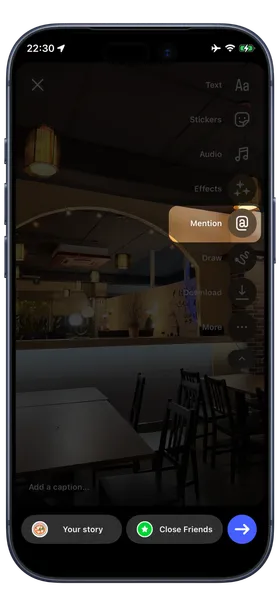
Mention @viminiapp in a Story and Vimini creates a vimini for that restaurant. All that is left is your rating.
Vimini uses the location sticker first. Without it, it looks at your caption, the text in your Story, or a message you send with the name of the place.
Open Settings, enter your Instagram username, and type the code you receive in your Instagram messages. If you don’t see it, check your message requests.
Post a Story from the restaurant, mention viminiapp, and add the location sticker. Forgot the sticker? Send Vimini a message with the name of the place.
Vimini notifies you when the vimini is saved and reminds you to rate it. On iPhone you can rate straight from the notification. Imported viminis also wait for you on your Home.
No. You only add your username and confirm it with a code sent by Instagram message. Vimini only looks at the Stories where you mention @viminiapp.
It asks you to confirm the restaurant from a short list of matches before saving the vimini.
Send Vimini a message with the name of the place after posting, and it is added to your viminis.
Yes. Use Share on Instagram on any vimini to create a Story image.
Download Vimini, connect your Instagram username, and mention @viminiapp next time you eat out.